What are skills in the TheyDo Agent?
Private beta: Skills are currently in private beta. Ask your CSM if you want to join the beta program.
Overview
Skills are saved workflows for the TheyDo Agent. You describe a process once (how your team summarizes a journey, how you turn raw feedback into insights, how your weekly report should read) and publish it as a workspace skill. From then on, anyone can run that exact process with a single command instead of re-explaining it in chat every time. This article covers what a skill is, why skills matter for teams, and where to find them.
Note: Skills require the TheyDo Agent to be enabled for your workspace. If you don't see the
Agentitem in your sidebar, ask your admin about AI access.
The problem skills solve
The TheyDo Agent is good at following instructions, but chat instructions disappear when the conversation ends. If your team has a standard way of doing something, someone has to re-type those instructions every time, and every teammate phrases them a little differently, so the results drift.
A skill fixes that. The instructions live in the skill, not in anyone's memory. The person who knows the process best writes it down once, and everyone else gets the same quality of output by running the skill. Your team's way of working becomes something the Agent knows, instead of something each person has to carry around.
What a skill looks like
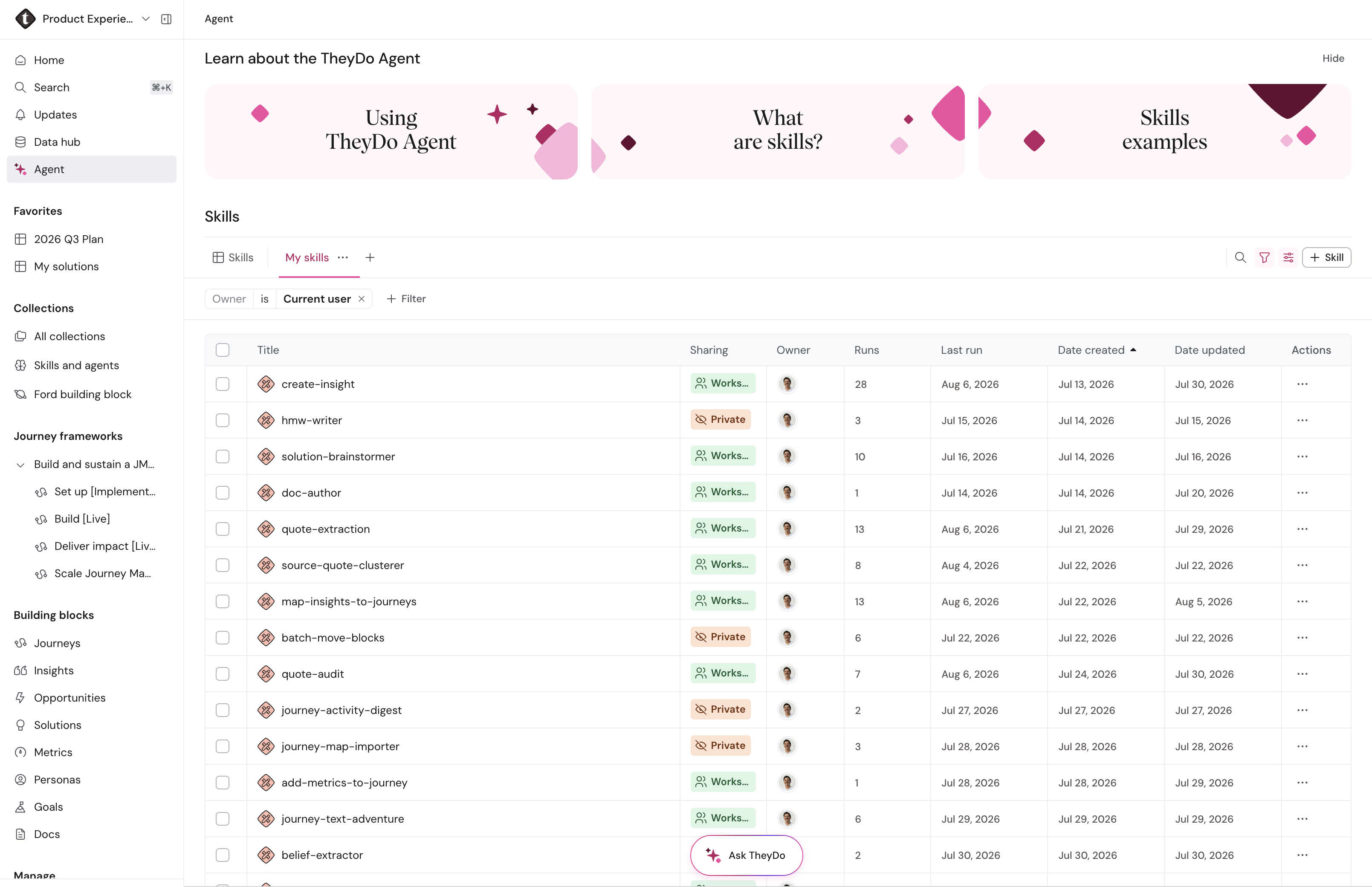
A skill is a set of instructions the Agent follows when you trigger it. Each skill has its own detail page where you can read and edit what it does, using the same rich text editor you know from Docs and building block descriptions. Skills also appear in global search (Cmd+K / Ctrl+K), so a teammate can discover them the same way they'd find a journey or an insight.
Skills are created by you and your teammates. A skill saves a workflow your team cares about, which is where skills earn their keep: they encode how your team works, so everyone gets the same quality of output by running the skill instead of re-explaining the process in chat.
Skills can also reference other skills. That lets you chain a bigger workflow out of smaller pieces: for example, one skill that mines insights, applies your tagging conventions, and then produces a summary, each step handled by a skill your team already trusts.
Where to find skills
- Open the
Agentsection in the sidebar to see the skills available in your workspace. This is also where you manage skills. - In any agent chat, type
/skillsto bring up your skills trigger one directly. - Search for a skill by name in global search (Cmd+K / Ctrl+K).
What skills are good for
The best skill candidates are tasks that repeat and have a "right way" your team cares about:
- Write weekly executive summaries in a consistent structure and tone.
- Run journey audits before stakeholder readouts.
- Standardize insight titles, tags, and links.
- Rewrite imported insights in your team's preferred style.
- Detect near-duplicate insights before merge review.
- Clean and map AI-generated insights to the right journeys before sharing.
If you find yourself pasting the same instructions into the Agent for the second time, that's the signal to save them as a skill instead. See How to create a skill.
Tip: Start with one high-frequency workflow rather than trying to encode everything at once. A single skill your team actually runs every week beats ten that nobody remembers exist.
Learn more
To run a skill see How to use a skill. To build your own, see How to create a skill.