Merge and split insights with AI
Overview
As research accumulates, insight libraries drift toward two problems: duplicates that say the same thing twice, and catch-all insights that bundle several findings into one. AI helps with both. Merging consolidates duplicate insights into a single, stronger one with an AI-generated combined result, and splitting breaks a multi-topic insight apart. This article covers how to merge insights, how AI-detected duplicates work, and how to split insights.
Note: These features require AI to be enabled for your organization and workspace.
Merge duplicate insights
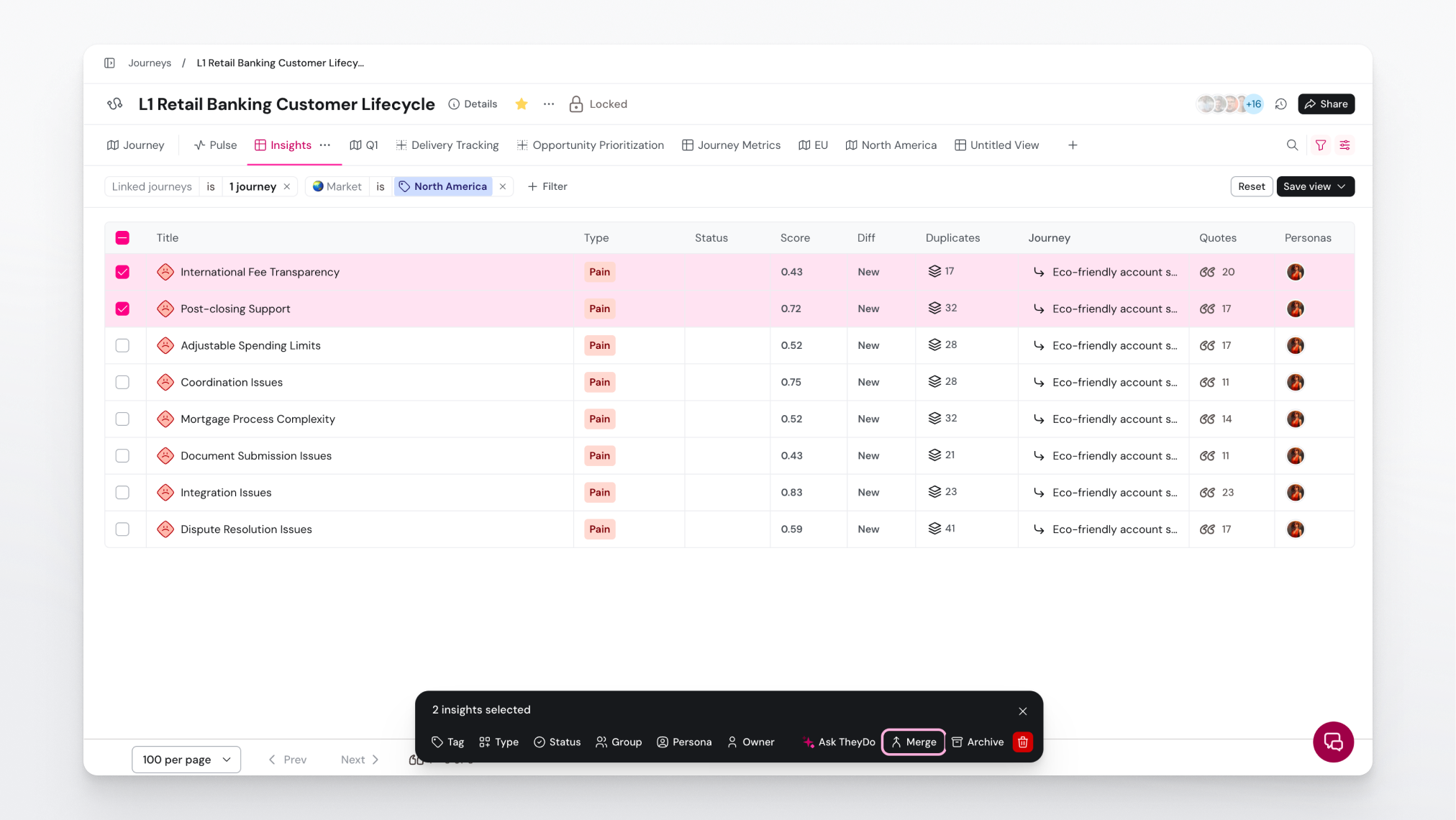
Merging combines two or more insights into one. From the insights library:
- Open the insights library and select the insights you want to combine.
- Choose
Merge. - In the merge screen, pick the baseline insight: the one the others will fold into.
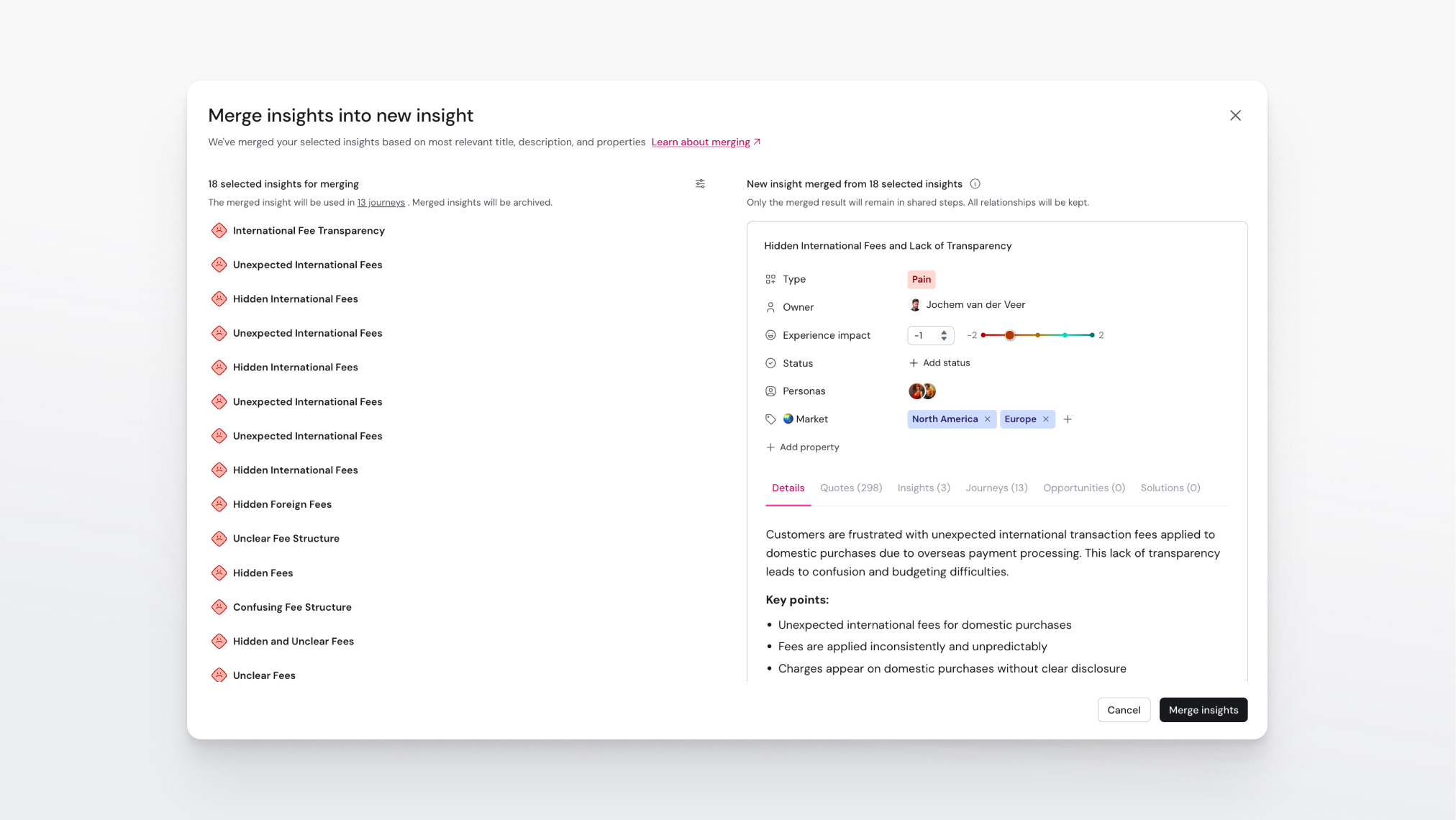
- Review the AI-generated combined preview. The AI drafts a merged title and description, and carries over properties like type, status, owner, personas, and groups. Everything is editable before you confirm, and you can toggle individual groups on or off.
- If the selected insights appear in any journeys, the screen shows how many journeys are impacted. Click the count to see which ones.
- Confirm the merge.
The source insights are archived, not deleted, and the merged insight's detail page keeps a trail: "Merged from N other insights", which you can click to see the originals.
Note: Summary insights can't be merged, and archived insights are excluded from a merge. If either type ends up in your selection, the merge screen marks it as ignored.
Let AI find the duplicates for you
Where duplicate detection is available in your workspace, the insights library shows a Duplicates column. When TheyDo detects insights that closely resemble each other, the column shows a count per insight. Click the count to open the merge screen pre-filled with that insight's detected duplicates, then review and confirm as usual.
Tip: Sort by the Duplicates column periodically and work through the clusters, so cleanup stays a small recurring habit instead of a quarterly project.
Merge inside a journey
You can also merge insights directly from a journey's insight list. There, merging works with a target picker: you choose which insight survives, and the other selected insights are folded into it.
Note: Journey-scoped merging is unavailable while an AI split or merge job is running or awaiting review on that journey, and summary insights can't be part of it.
Split an insight with AI
Splitting is the reverse of merging: when one insight covers more than one distinct finding, AI can break it into separate insights so each finding can be linked, scored, and prioritized on its own. Like other AI workflows in TheyDo, a split runs as a job on the journey and its results are gated behind a review before they become permanent.
Reviewer note: Confirm with product the exact entry point and steps for starting an AI split, and what the review step looks like. Glossary coverage confirms AI split jobs exist and are review-gated, but not the flow details.
Good to know
- One AI merge or split job runs per journey at a time. Wait for the active job's review to finish before starting the next one.
- Merging is how you consolidate; if what you actually want is a rollup of everything in a lane, use a summary insight instead. See Summarize a journey with AI.